Business Hours: Monday to Thursday: 7:00 AM – 3:00 PM (Support until 5:00 PM) | Friday: 7:00 AM – 3:00 PM (Support until 2:30 PM)
(+34) 957 326 107
Business Hours: Monday to Thursday: 7:00 AM – 3:00 PM (Support until 5:00 PM) | Friday: 7:00 AM – 3:00 PM (Support until 2:30 PM)
Copyright © 2025 Qualicard. All Rights Reserved.


Technical Support

Software Card Printing Plastic QUALICA-RD
Software Card Printing Plastic QUALICA-RD
- Product ID: 46316
- Category: Softwares
The most powerful software on the market.
4 versions available.
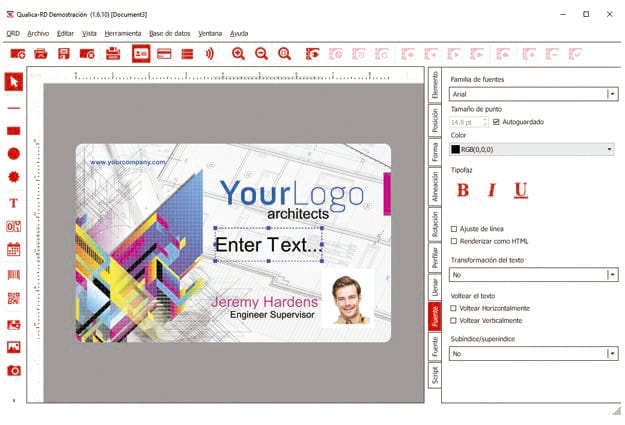
Qualica-RD® Card Printing Software starts with the BASIC version, featuring essential functions for card design, encoding, and printing.
It includes predefined templates, signature capture, editing view for text data entry, database view, 1D barcodes, WIA / TWAIN / DirectShow capture, support for magnetic encoding, complete management of an internal document database with photo linking, and creation, editing, browsing, and record search.
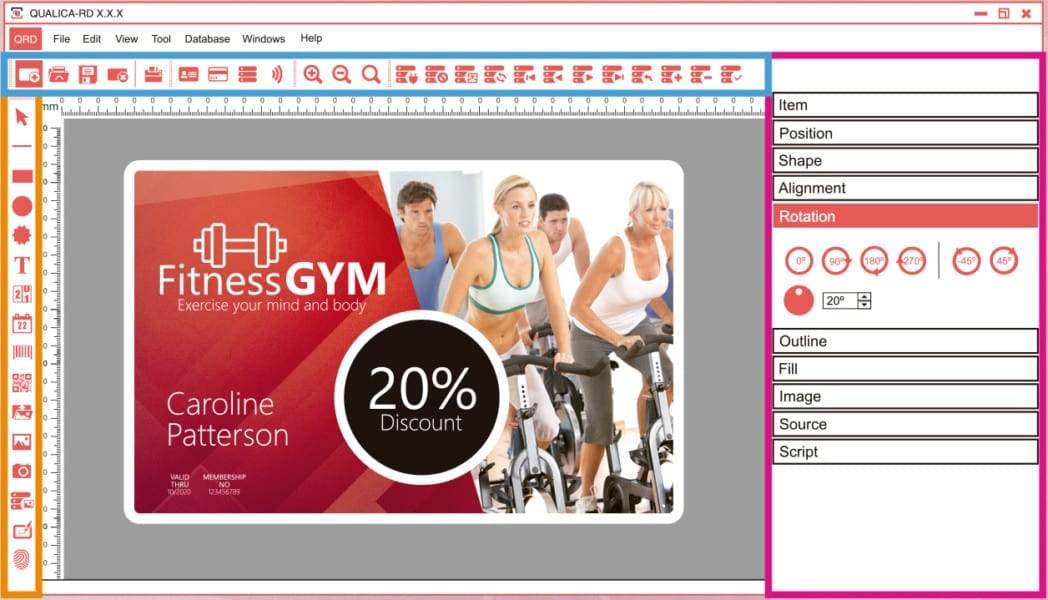
Qualica-RD TIME & CLOUD Software Versions
-
-
-
-
-
-
-
-
-
-
-
-
-
- BASIC DATABASE: adds QR codes, 2D barcodes and connection to database .XLS, .XLSX, .CSV and .TXT.
- ADVANCED: adds local MS Access and SQLite connection, photo in the database, face detection tool with automatic cropping.
- PROFESSIONAL: also includes ODBC connection, contactless RFID encoding, card encoding with contact chip, plugin for contact chip, support for internal and external RFID encoder, fingerprint acquisition, multiple simultaneous card designs, auto-printing based on DB changes, and user permissions management.
- PREMIUM: completes the software with advanced features such as DESFIRE® encoding, web print server, license for up to 16 PCs on the network within the same scope and subnet.
-
-
-
-
-
-
-
-
-
-
-
-
| Database | DB connection with photo Record search Print selected record |
|---|---|
| Magnetic encoding | Magnetic encoding |
| Content and installation | Full installation on USB drive HASP USB key protection Digital Manual (PDF) Sample templates |
| Tools & Image | DirectShow image acquisition WIA & TWAIN image acquisition Pre-designed images and shapes Variable objects (date printing, print counter…) Built-in image editor Image effects Image import from gallery Signature acquisition 1D barcodes |
| Printing | Print queue management (one by one, all, wait for print job…)<br>Duplex printing<br>Batch printing<br>Ethernet compatibility<br>Print criteria |
| Interface | Editing of text and image in the card design Database view |
| Minimum system requirements | Windows 10® (32-bit or 64-bit), Windows 8® (32-bit or 64-bit), Windows 7® (32-bit or 64-bit), Windows Vista® (32-bit or 64-bit), Windows XP® with Service Pack 3, Windows Server 2003®, Windows Server 2008®, Windows Server 2012®, Mac OS X (only for 64-bit Intel processors) from 10.11, Intel® Pentium® 800MHz processor, 512MB of RAM, 500MB of free space, 1024×768 resolution, 1 USB port. |
| Others | Software updates included Remote editing of updates <ul><li>Check additional features for each version</li></ul> |